Monitoring & troubleshooting
When a sync fails, open the Sync Runs tab. Every call to NetSuite is listed there with its status, its error and the data it sent. Most problems are solved by reading one run.
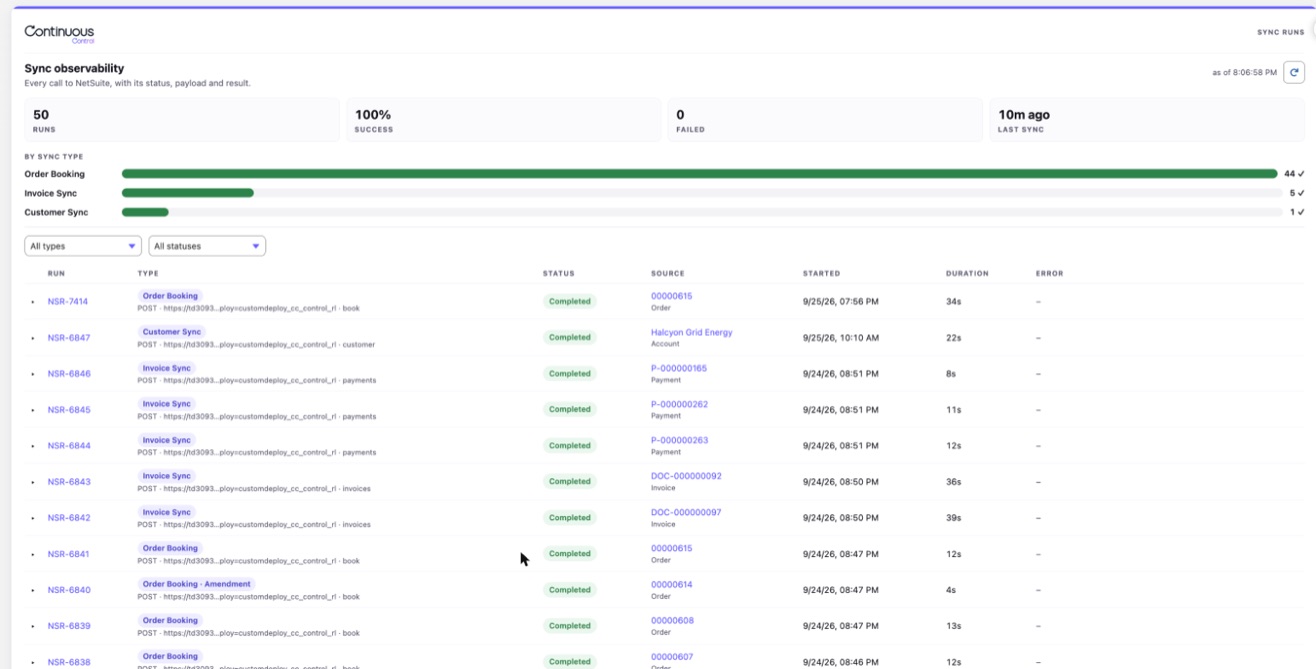
Check sync health
The top of the tab shows four numbers: Runs, Success, Failed and Last sync. Below them is a bar for each type of sync, such as Order Booking or Invoice Sync.
The table lists every run, newest first. Filter it by type or status. Each row links to the record that started it, such as the order or invoice.
A run marked Completed with warnings finished, but has something to tell you. It counts as a success and gets an amber label. A bar reading "12 ✓ (3 with warnings)" means all twelve finished, and three have warnings.
Read a failed run
Click a run to expand it. Then read it in this order:
- The status and error. This is usually enough.
- Result ← NetSuite. This is NetSuite's answer: counts per section, the records it made, and any errors. Revenue engine results are added about 30 seconds later.
- Payload → NetSuite. This is what Salesforce sent. If a value is wrong in NetSuite, check whether it was already wrong here.
Each row also shows where the run was sent, such as "POST · https://… · book". Hover over it to see the full address. This helps when a call uses a custom endpoint.
On a sync card, an amber strip means the run finished with a note. Only a red strip means it failed.
Each row on the card shows how many records the last run sent. A row with a warning icon, such as "0 of 7 synced", means the run sent fewer of those records than the record has. Reload the page and the card still shows the last run's result, pill and strip included.
Get told about failures
When a run fails, the person who started it gets a Salesforce notification. You can also send failures to an email address. See Sync settings.
A billing run with a few failed invoices still finishes. It lists each failure, and only those invoices are sent next time.
Fix common errors
Messages in quotes are what the app shows. Text in angle brackets is filled in with a name or number.
| Message | What it means | What to do |
|---|---|---|
| '"<Call>" isn't set up yet. Deploy the prebuilt calls in step 6 of the NetSuite Connection page, then try again.' | The prebuilt calls haven't been deployed. A sync or Flow action can't run without its call. | Click Deploy prebuilt calls & mappings in wizard step 6. Then sync again. |
| '"<Call>" isn't set up yet. Deploy the prebuilt calls in step 6 of the NetSuite Connection page, then reload this page.' | The sync card shows this in place of its button. The call it runs hasn't been deployed. | Deploy the calls in wizard step 6, then reload the record page. |
| "No calls are set up yet. Deploy the prebuilt calls in step 6 of the NetSuite Connection page." | The Calls & Mappings tab has no calls to show. | Click Open NetSuite Connection and deploy the calls in step 6. |
| "Continuous Control isn't set up yet. Deploy the prebuilt calls in step 6 of the NetSuite Connection page, then try again." | The call exists but was never published. | Click Deploy prebuilt calls & mappings in wizard step 6. It publishes any call that isn't live. Then book or sync again. |
| '"<Call>" is turned off. Turn it back on in Calls & Mappings, then try again.' | Someone turned off that call. | Turn the call back on in Calls & Mappings. Then try again. |
| "This order has no Contract. Add one before you book to NetSuite." | The order isn't linked to a Contract. | Add the Contract to the order, then book again. |
| "Activate first" | The order isn't activated yet. | Activate the order. |
| A booked order shows "Prices aren't up to date. Refresh Prices." | Booking writes NetSuite ids onto the order lines. Revenue Cloud flags any order whose lines change after activation, even when no price changed. | Don't reprice a booked order: its amounts could change from what NetSuite holds. To hide the banner, turn on Hide Price Refresh Notification in Setup > Revenue Settings. It hides the banner on quotes too. |
| A card row reads "<n> of <m> synced" with a warning icon | The last run sent fewer of those records than the record has. The strip above the button usually says why. | Fix what the strip or the run's errors name. Then click Sync again. |
| The card's pill reads "Booking failed" or "Sync failed" | The last run on this record failed. The red strip shows its error, even after a reload. | Fix the cause, then book or sync again. Nothing needs cleaning up first. |
| "Completed with warnings:" and "lines have no NetSuite item" | The order was booked, but some products have no NetSuite item. | Match or create the items in wizard step 7, or in NetSuite. Then click Sync again. |
| "NetSuite reported no order landed for <order>, so this booking created no NetSuite order." | NetSuite got the call but made no order. The run is marked Failed. | Read the run's errors, then its payload. |
| "A booking run for this order is already in progress." | Another run for the same record is still going. | Wait for it to finish. A run stuck for more than 10 minutes is replaced by your next try. |
| "This order is being booked to NetSuite right now. Sync its lines when the booking finishes." | You clicked Sync Order Lines, or a Flow called it, while the order was booking. | Wait for the booking to finish, then sync the lines again. |
| "Order Line Sync needs one setup step after an upgrade." | Your org was updated from an earlier version. A package update doesn't add the new sync type to the Type picklist. | In Setup, add Order Line Sync to the Type field on NetSuite Sync Run. Then sync again. |
| "None of these order lines are in NetSuite yet. Book the order again to add them." | The lines were added after the order was booked. | Book the order again. Then sync its lines. |
| "Order lines synced with warnings" and "NetSuite has no order line for <n> of these lines" | NetSuite has no record of those lines yet. The other lines were updated. | Book the order again, then click Sync Order Lines. |
| "This call needs Continuous NetSuite package 3.3.0 or later …" | Order Line Sync needs NetSuite release ns-v3.3.0, and the account is on an older one. | Install the current NetSuite release. Then run Verify installation in wizard step 4. |
| "This order has too many lines to sync in one run." | The order has more lines than one line sync can carry, about 900. | Send the lines in smaller groups with the Flow action. |
| "… belongs to another Salesforce org … Only that org can update it" | A different Salesforce org booked that line into this NetSuite account. | Update the line from the org that booked it. |
| A % Complete obligation recognized far less than expected | NetSuite reads % Complete as points. A value of 0.4 means 0.4%. | Enter 40 for 40%, then run Update Revenue Plans. |
| "Unauthorized endpoint" or "Salesforce blocked the call to NetSuite" | Salesforce isn't allowed to call that address. | Add the Remote Site Settings from wizard step 2. A custom endpoint needs its own Remote Site Setting too. |
| "Host <host> has no Remote Site Setting" | Validate caught the same problem before you activated a call. | Add the host under Setup, Security, Remote Site Settings. Then validate again. |
| "NetSuite rejected the signature (HTTP 401)." | A credential is wrong, or the token was revoked. | Re-enter the credentials in wizard step 1. Then test again in step 3. |
| An HTTP error naming an address you don't know | The call points at the wrong NetSuite script or deployment. | Fix the endpoint, or click Reset to default in the endpoint editor. Activate the call and run it again. |
| "NetSuite returned a web page instead of data." | NetSuite answered with a login or error page, usually an expired token or a wrong RESTlet address. | Run Test the connection in wizard step 3. Fix what it reports, then sync again. |
| "NetSuite still had work left after 25 legs, so the run stopped." | A very large order or call needed more follow-up calls than the safety limit allows. What already landed in NetSuite is kept. | Read the run's errors, then book or run the call again. |
| "… didn't move its resume point, so the run stopped instead of repeating leg <n>." | NetSuite asked to continue but made no progress, so the run stopped instead of looping. | Read the run's errors. Fix what they name, then run it again. |
| "revenue engine didn't finish in NetSuite. Use Refresh POBs later" | The sync itself succeeded. The background job that updates obligations and revenue plans stopped early. | Click Refresh from NetSuite on the Contract later to bring the obligations up to date. |
| A Flow action returns "Skipped: this change came from a Continuous Control writeback" | Your Flow fired again because Continuous Control updated the record's sync status. It's skipped so the sync can't loop. | Nothing to fix. Add an entry condition to your Flow if you'd rather it not fire on these updates. |
| An invoice fails in NetSuite with a tax error | NetSuite can't find a tax code for the customer. | Check the customer's tax setup in NetSuite. See NetSuite manual setup. |
| A mapping warning on a run | A mapping row was skipped. The warning names the row. | Fix the row in the mapping editor. |
| "the user running this sync can't read <field>" | The person who started the sync can't see that field in Salesforce. The sync left it out and sent the rest. | Give that user read access to the field, or remove the row. Then sync again. |
| "Something unexpected went wrong in Salesforce." | A card or the wizard hit an error it didn't expect. The details are in the Salesforce debug log. | Try again. If it keeps happening, ask your Salesforce admin to check the debug log. |
| An invoice is left out of a billing run | It isn't posted, it's already synced, its account isn't in NetSuite, or it's negative. | See which documents are sent. |
| "NetSuite reached its usage limit after <n> of <m> <documents/payments/refunds/products>." | A large batch ran into NetSuite's limits partway through. Everything before the stop already landed. | Nothing, for a batch. The next leg finishes the rest. For a single document, sync it again. |
| "<Payment/Refund/Product> … stays unsynced because NetSuite reached its usage limit." or "Account <name> stays unsynced …" | The one document or account a run was writing didn't finish, so it wasn't marked synced. | For a batch, nothing. It's picked up automatically. Otherwise, sync it again. |
| "The <action> call stopped on an error in NetSuite: <message>." | Something failed in NetSuite outside its normal error handling. | Open the script log in NetSuite for the detail, then run it again. |
| "<n> schedule row(s) are still being posted by another run … Run again in a few minutes." | Two runs tried to post the same period's revenue at once. Recognize Revenue held back rather than post it twice. | Wait a few minutes, then run Recognize Revenue again. |
| "This connection uses the <role> role. Move it to the Continuous Control Integration role. A later release limits the endpoint to that role and Administrator." | The NetSuite token isn't on the new integration role or Administrator. Nothing fails today. | Assign the Continuous Control Integration role to the integration user, create a new token, and enter it in wizard step 1. |
| "NetSuite id <n> belongs to a different record. It was ignored, and the record was looked up by its Salesforce id." | The NetSuite id Salesforce sent already belongs to another Salesforce record. NetSuite used the Salesforce id instead. | Nothing, usually. If the record is wrong in NetSuite, check which Salesforce record the id should belong to. |
| "Files of type .<ext> are not accepted, so the file was not saved." | The document has a script, markup, or otherwise unsupported file extension. | Send a document or image type Continuous accepts, such as a PDF. |
| "The file name cannot be used" or "The folder name … cannot be used" | A document or folder name has a slash or another character NetSuite can't use in a file name. | Rename the source document in Salesforce and sync again. |
| "Continuous does not attach files to <type> records, so the file was not saved." | The document's target record type isn't one Continuous syncs. | Attach the document to a record type Continuous syncs, such as an invoice. |
| "<script id> is not on the relay allowlist, so nothing was sent." | A call is relaying to a RESTlet the Relay Allowlist doesn't list. | Add the script id to Relay Allowlist on Continuous Revenue Settings in NetSuite, or leave it blank to allow any RESTlet. |
| "… already relayed this call, so relaying … would loop" or "already relayed <n> times, and 3 is the limit." | A relay chain came back to a RESTlet already in it, or ran longer than three hops. | Point the relaying call at the RESTlet that actually answers it, not one that forwards again. |
| An application "… so this application was skipped. Sync that document again, then sync this one." | A payment's or refund's application target couldn't be found, or isn't the right kind of document. | Sync the target invoice, payment, or credit memo again, then sync this one. |
| "<value> is not a NetSuite table name" or "… is not a NetSuite transaction type" | A custom mapping names a NetSuite table or transaction type that doesn't exist. | Fix the table or type in the mapping row, then sync again. |
The full text of every message is in the reference version of this page.
Retry safely
Fix the cause, then click the same button again. Every sync is safe to repeat. It updates the same NetSuite records instead of making new ones.
For problems in NetSuite, open the Close Run Log on the Continuous Control tab. It lists every revenue engine run with its counts.