Book orders as Sales Orders
You can book a Salesforce order straight into a NetSuite Sales Order. Change one object on the Order Booking call, and each booking lands a real NetSuite transaction.
By default, a booked order lands as an RC Order with RC Order Lines. RC stands for Revenue Cloud. The revenue engine uses those records to plan revenue. A Sales Order suits a company that fulfills orders in NetSuite, or runs revenue somewhere else.
Choose replace or add alongside
You have two ways to get a Sales Order.
- Replace. Point the shipped Order object at Sales Order. Each booking then lands a Sales Order instead of an RC Order. The revenue engine doesn't run for those orders.
- Add alongside. Leave Order as it is, and add a Sales Order object of your own. Each booking lands both, and the revenue engine still runs. See Add your own objects to a call.
Point the Order object at a Sales Order
QuantumBit's operations team works from Sales Orders in NetSuite, so QuantumBit wants each booking to land as one.
- Open Calls & Mappings and pick Order Booking.
- Click the Order object, then Edit node.
- Set the kind to Standard record, then pick Sales Order under Transactions.
- Save. The Order's shipped rows were written for the RC Order, so the editor offers to replace them. Click Replace or Keep my rows.
- Validate and activate the call.
You don't need to add anything for the lines. Order Line follows Order onto the Sales Order's item list by itself. The editor tells you so before and after you save.
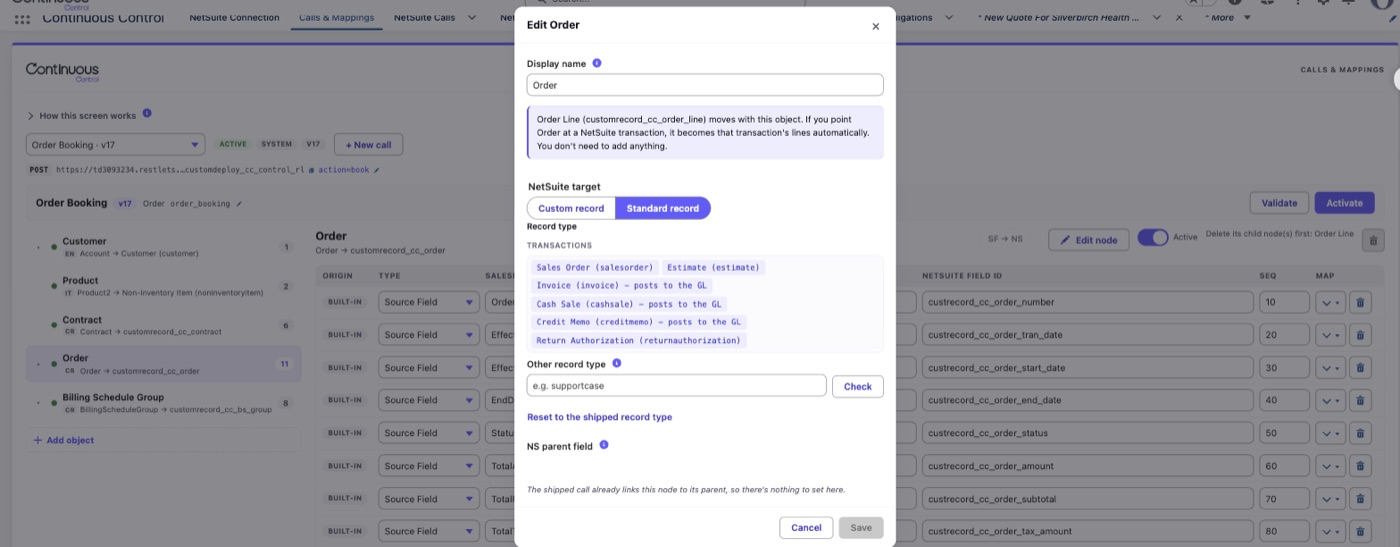
Which transactions you can pick
The list offers six. Sales Order, Estimate and Return Authorization don't post to the general ledger, and they're the usual choices.
Invoice, Cash Sale and Credit Memo post to the ledger. They book revenue and receivables the moment they land. They also skip the tax handling Invoice Sync applies. Before you can save one, you have to tick I understand this books revenue at sync time.
To go back to the RC Order, open the same editor and click Reset to the shipped record type.
Only some objects can be pointed elsewhere. Order can become a transaction, and Product can become any item type. The documents on Invoice, Credit Memo, Payment and Refund Sync stay fixed.
What changes after the switch
- The revenue engine skips these bookings. The sync card and the run both say so. See One engine, two switches.
- NetSuite doesn't generate a second Sales Order, even if Create Native Sales Order is on.
- Booking the same order again updates the same Sales Order. An amendment is its own order, so it gets its own Sales Order.
- Lines are matched by their Salesforce id. Changed lines update, and new lines are added. A line Salesforce stops sending stays in NetSuite, and the run notes it.
- Lines carry the item, quantity, rate, amount and description, plus any rows you add. They carry no revenue dates or rules.
- Billing schedules still sync, without a link to an order line.
- The Salesforce order stores the Sales Order's NetSuite id. Order lines don't get an id.
- The sync card's link reads Open Sales Order in NetSuite.
- Records from earlier bookings stay in NetSuite as they are.
Keep one system billing
If Salesforce sends invoices, NetSuite mustn't bill the same Sales Order. So each Sales Order the Order object lands is marked Do Not Bill (Continuous). NetSuite refuses to bill it while that box is checked.
To bill in NetSuite instead, turn on Allow NetSuite billing in step 8 of the Connection wizard. Then stop syncing Salesforce invoices for those contracts.
A transaction object you add yourself isn't marked. Check Do Not Bill on those documents yourself if NetSuite could bill them.