The revenue lifecycle
Continuous Control tracks every contract with three numbers: Booked, Billed and Recognized. Each record it syncs moves one of them. This page explains what each number means and where it comes from.
Follow one contract through the year
QuantumBit sells Kingsbridge Digital a one-year API Management subscription for $12,000. It bills $3,000 each quarter, in advance. Here's how the numbers move.
| When | Booked | Billed | Recognized | Deferred |
|---|---|---|---|---|
| QuantumBit books the order | $12,000 | $0 | $0 | $12,000 |
| The first quarterly invoice posts | $12,000 | $3,000 | $0 | $12,000 |
| Finance closes month one | $12,000 | $3,000 | $1,000 | $11,000 |
| The year ends | $12,000 | $12,000 | $12,000 | $0 |
The customer's payments don't appear in this table. Cash settles what the customer owes you, but it doesn't move these numbers. Revenue follows what you sold and delivered.
Know what each number means
| Number | What it means | What moves it |
|---|---|---|
| Booked | The total the customer committed to | Booking an order or an amendment |
| Billed | What you've invoiced, minus credit memos | Syncing posted invoices and credit memos to NetSuite |
| Recognized | What you've earned and posted to the general ledger | Recognize Revenue journal entries |
| Deferred | Booked minus Recognized. It's revenue you haven't earned yet. | Worked out from the other numbers |
Trace each number to its records
Each number adds up real records, so you can always click through to what's behind it. The records are grouped by performance obligation, one per product on the contract.
Booked adds up the order lines. When Kingsbridge adds API units with an amendment, the new lines join the same obligations. Booked goes up by the amount of the change.
Billed adds up the invoice lines. Each posted invoice line is tied to its obligation by an Obligation Detail record. Credit memo lines count as negative. You can drill from Billed to the invoice lines behind it.
Recognized adds up the revenue schedule rows that have posted. Each row shows the journal entry that posted it.
See the numbers in both systems
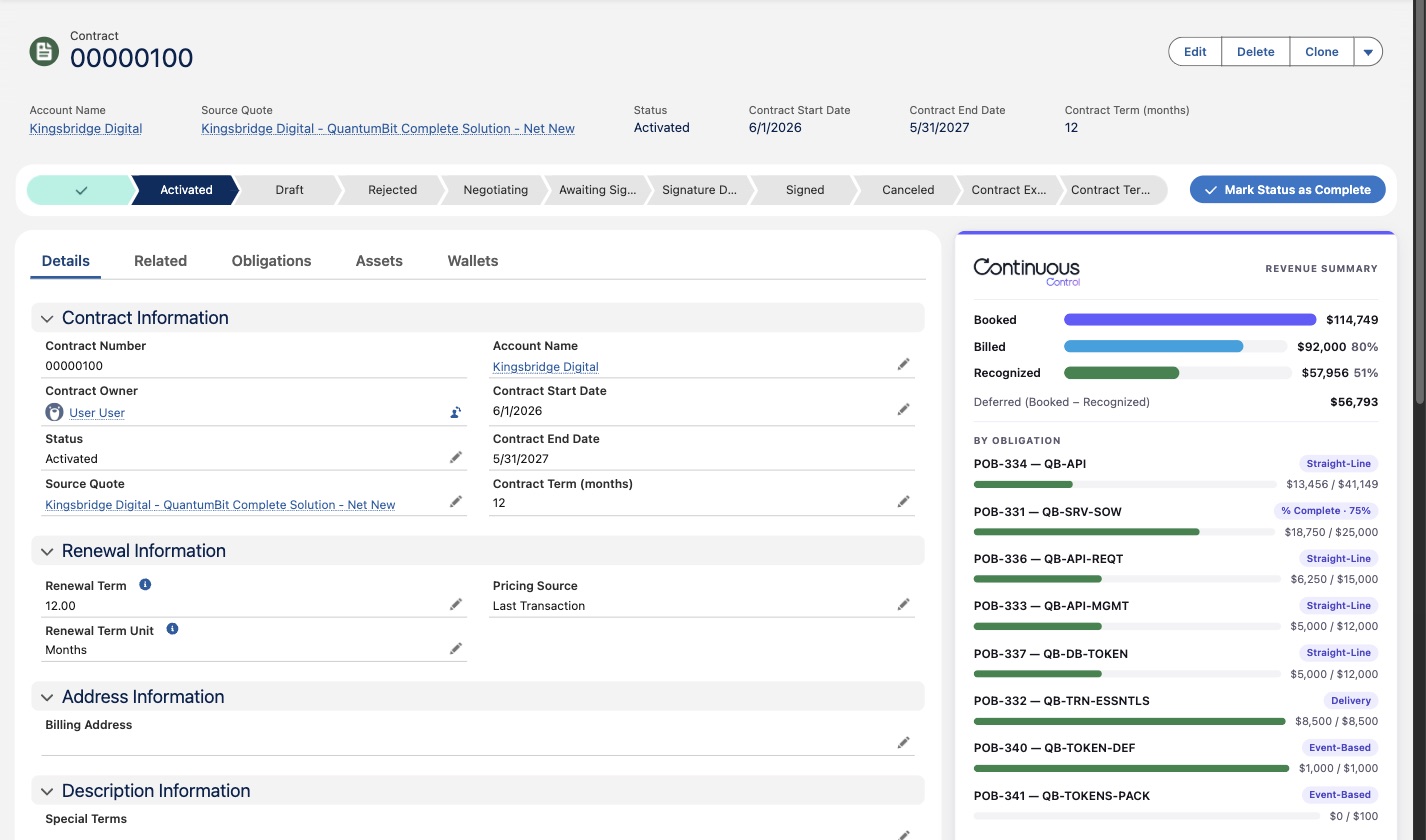
In NetSuite, the RC Contract shows the numbers at the top, with each obligation below. RC stands for Revenue Cloud. In Salesforce, the Revenue Summary card on the Contract shows the same numbers, copied from NetSuite.
Follow the money through the ledger
Invoices post to Deferred Revenue first. Revenue moves out of Deferred only when it's earned.
- Each product Continuous Control syncs posts its income to your Deferred Revenue account. So when Kingsbridge's $3,000 invoice posts, it credits Deferred, not Revenue.
- At month end, Recognize Revenue posts one journal entry for the period. It debits Deferred Revenue and credits Revenue. Each obligation gets its own pair of lines, tagged with the customer and the obligation.
- Each transaction has a GL Impact subtab that shows its debits and credits. You can follow an amount from invoice to Deferred to Revenue.