Performance Obligations
A performance obligation, or POB, is one promise you made to a customer. Continuous Control tracks revenue per obligation. Order lines are grouped into obligations for you, so you never assign them by hand.
Understand what an obligation is
The ASC 606 standard asks you to account for revenue per performance obligation, rather than per invoice or order. Continuous Control makes each obligation a record in NetSuite.
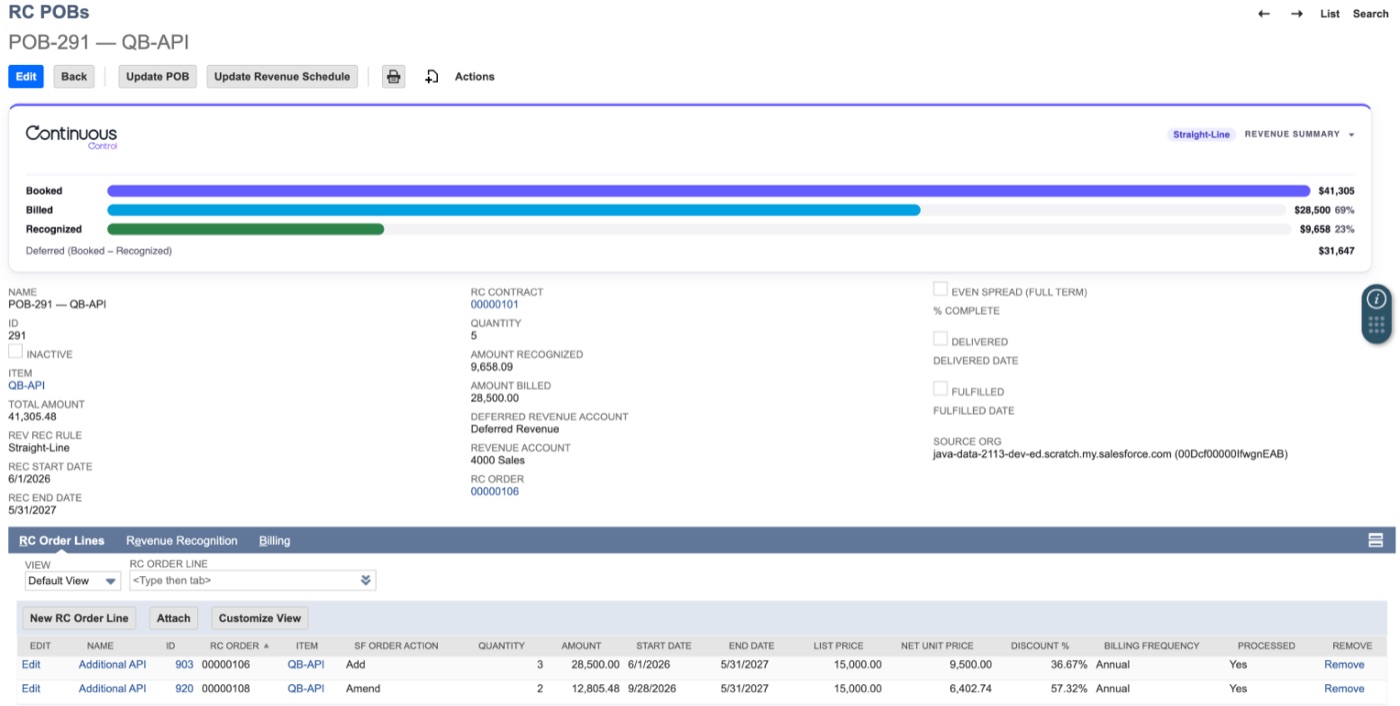
QuantumBit sells Kingsbridge Digital 100 API units and Essentials Training. That's two promises, so the contract gets two obligations. Each one has its own:
- Booked, Billed and Recognized amounts
- Recognition method, taken from the product. You can change it on the obligation.
- Start and end dates, quantity, and delivery status
- Order lines, revenue plan, invoice links and journal lines, each on a subtab
Let lines group by product
The Update POBs process groups the order lines on a contract by product. A line joins the obligation for its product. If it's the first line for that product, a new obligation is created.
Say Kingsbridge adds 50 API units mid-year. The amendment line joins the existing API obligation. Booked goes up by the amount of the change, and the history stays on one record.
So an obligation can span the original order and every amendment. There's nothing to assign and nothing to misfile.
Obligations are named POB-{id} — {item name}, so lists look the same everywhere.
Usage works a little differently. Say QuantumBit bills Kingsbridge for tokens as they're used, with no order line. That billing item gets its own event-based obligation when it first bills.
Read the amount and quantity
The amount is the Booked total of the obligation's lines. The quantity is the total units the customer bought, after amendments:
- A three-year subscription for 1 unit a year has a quantity of 1.
- A ramp of 100, then 200, then 300 units has a quantity of 600.
- An upsell of 500 units on a 100-unit contract gives 600.
Quantity is for reporting only. It never changes amounts, billing or recognition.
Mark lines delivered or fulfilled
Some products earn revenue only when you deliver them. Kingsbridge's Essentials Training is one. Its obligation waits until the training is done.
Each order product in Salesforce has Delivered and Fulfilled fields, each with a date. It also has a % Complete field for work that earns revenue as it progresses. Your fulfillment process sets them. That can be Dynamic Revenue Orchestrator, an order management system, a Flow or a person.
To send the changes to NetSuite, click Sync Order Lines on the order's sync card. A Flow can call Sync Order Lines to NetSuite instead. You don't book the order again.
When every line on the obligation is marked, Update POBs sets the recognition date to that date. All the revenue is then scheduled in that period. For a % Complete obligation, Update POBs averages its lines' percentages. See Recognition methods.
See obligations in Salesforce
After every sync, each obligation is copied back to Salesforce as a Performance Obligation record on the Contract. It shows the product, Booked, Billed and Recognized, quantity, recognition method, dates, delivery status and % Complete. These records feed the Contract's Revenue Summary card and your Salesforce reports.
NetSuite owns the data, so treat these records as read-only. Every refresh overwrites them. See Writebacks & the POB mirror.